QR Code Naming Convention: Find and Track Every Code
On this page
Name every QR code with the same four parts in the same order:
campaign – placement – location – date
Winter menu – table tent – Café King St – 2026-12
date = year first (YYYY-MM-DD or YYYY-MM) · campaign = reused, in lowercase, as the utm_campaign value on the link. Then your code list and your Google Analytics campaign reports use the same words.
Facts checked on 5 November 2026.
A QR code naming convention in four parts
A name only has to answer the questions you will ask months later: which campaign, where it was printed, which site or audience, and when. Put the broadest part first so codes from the same campaign sit together when you sort by name.
| Part | What goes in | Example |
|---|---|---|
| 1. Campaign | The offer or project, the same words you use in your analytics | Winter menu, Fall postcard |
| 2. Placement or variant | The printed item, or the offer when one item has several versions | table tent, flyer, window, 15% off |
| 3. Location or audience | Branch, city, event or mailing list | Café King St, Expo hall B, past customers |
| 4. Date | When it went out, written year first | 2026-12 or 2026-12-01 |
Separate the parts with – (a spaced dash) and keep that separator. The name is for people, so capitals and spaces are fine; the UTM values on the link follow stricter rules (below). Keep a short list of allowed placement words (flyer, never sometimes leaflet), because search only finds the words you typed.
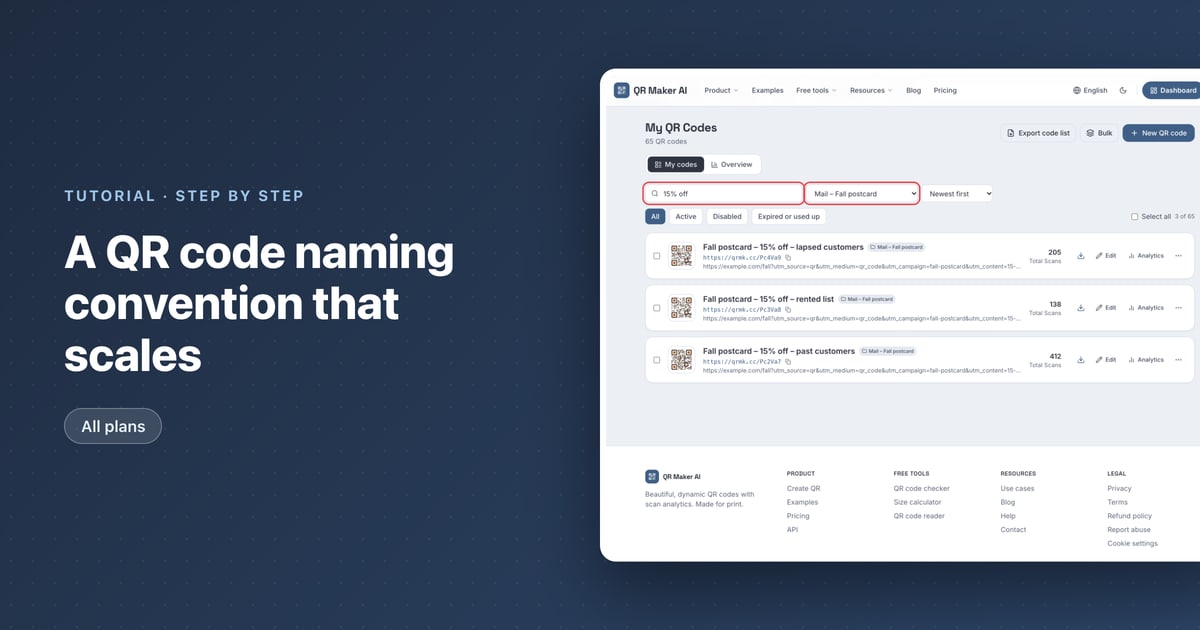
The demo account in the screenshots names a mailing this way: Fall postcard – 15% off – past customers, … – rented list and … – lapsed customers, one code per list.
Make one code per placement if you want to compare placements: without a placement tag on the short link, one code on both window and counter adds their scans together. How to Track QR Code Scans compares the ways to measure each placement, including that tag.
Good and bad QR code names
| Name | Problem | Better name |
|---|---|---|
QR 1 | Says nothing about where it is | Spring sale – window – Main St – 2026-03 |
New menu FINAL v2 | No placement, no location, no date | Winter menu – counter – Café King St – 2026-12 |
Flyer 01/05/26 | The date can be read more than one way | Open day – flyer – Main St – 2026-05-01 |
Sale window + counter | One code for two places, so its scan count mixes both | Two codes: Spring sale – window – … and Spring sale – counter – … |
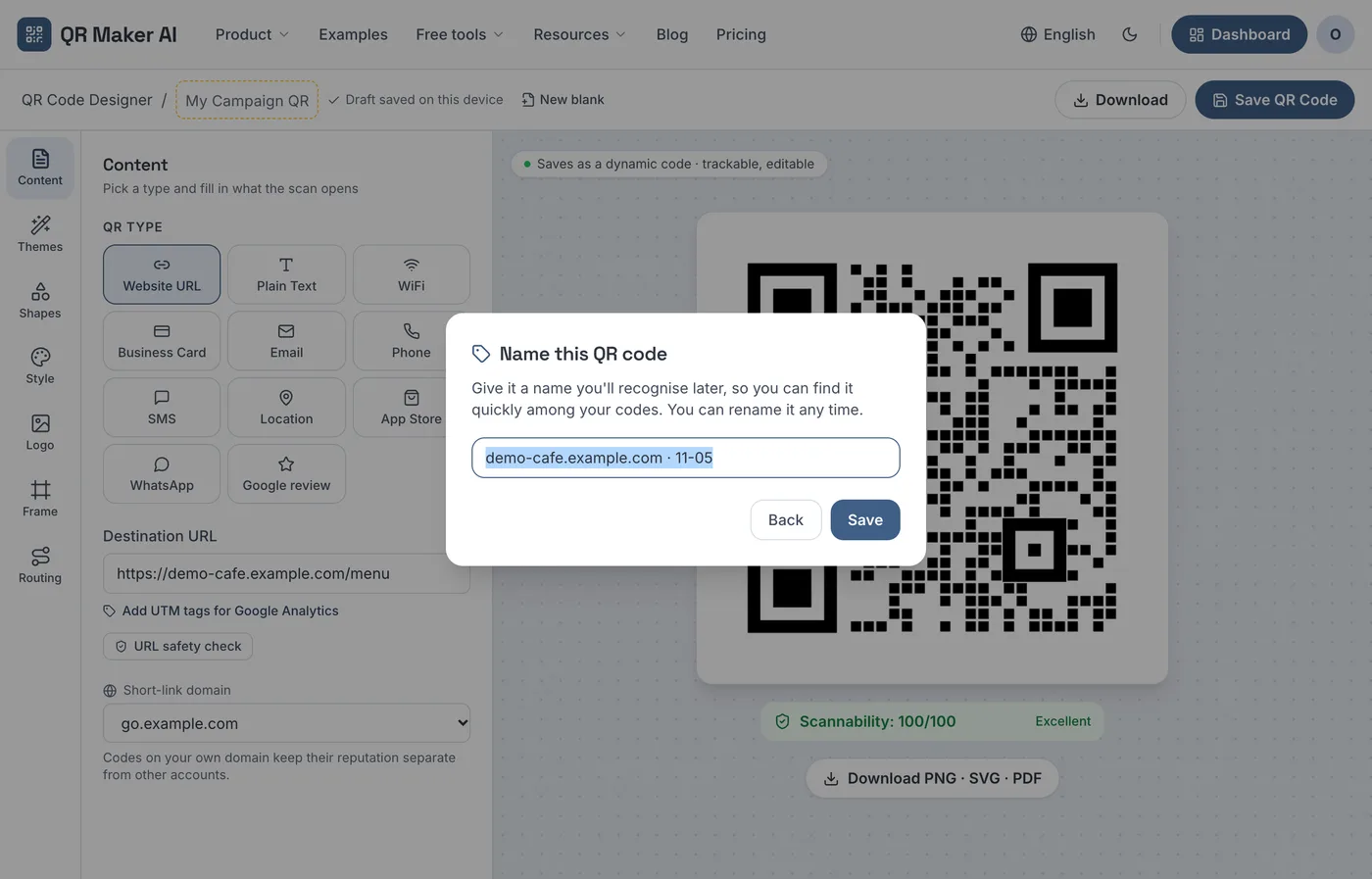
demo-cafe.example.com · 11-05 | A placeholder: no campaign, no year | Winter menu – table tent – Café King St – 2026-12 |
The last row is the name the editor suggests when you save without one. Rename it to fit your convention.
Match the name to your UTM parameters
UTM parameters are labels on the destination link that your website analytics reads. Google's help page on collecting campaign data with custom URLs says you "should always use utm_source, utm_medium, and utm_campaign". Google's page on traffic-source dimensions adds that missing UTM parameters "will result in (not set) values" in reports.
Three rules from Google's custom-URL page decide how you write the values:
- Case matters. "Parameter values are case sensitive", so
utm_source=googleandutm_source=Googleare counted as different sources. - Lowercase is the default. Google's best-practice table says "Use lowercase as a standard practice", and treats
SpringSaleandSpring_Saleas distinct values. - Match your own names. Google asks that values match your internal platform names so reports do not fragment.
So copy the campaign part of the code name into utm_campaign in lowercase with hyphens, and use the placement for utm_content, which Google describes as the parameter "to differentiate creatives":
Name:  Winter menu – table tent – Café King St – 2026-12
Link:  https://demo-cafe.example.com/winter-menu?utm_source=qr&utm_medium=qr_code&utm_campaign=winter-menu&utm_content=table-tent
Keep UTM values to letters, digits, hyphens and underscores. The URI standard, RFC 3986 section 2.3, lists these, together with the period and tilde, as "unreserved" characters: they are allowed in a URI as they are, and the standard says percent-encoded versions of them "should not be created by URI producers".
Write dates as YYYY-MM-DD
The W3C's article on date formats, last updated in 2016, notes that the United States writes MM/DD/YY, most of Europe DD/MM/YY and Japan YY/MM/DD, so a date such as 03/04/02 can be read more than one way. It adds that "ISO 8601 specifies a format of YYYY-MM-DD": year, then month, then day.
Year-first dates also sort correctly as plain text. RFC 3339, section 5.1 explains that when date parts run "from least precise to most precise", strings in the same format (and, for times, the same time zone) can be sorted as text into time order. Our recommendation: pick one precision per campaign, either all 2026-12 or all 2026-12-01, so every name uses the same format.
Name codes as you save them
In QR Maker AI, the name box sits in the top bar of the QR code designer, with the placeholder "My Campaign QR". Saving a dynamic code needs a free account with a verified email; How to Create a Dynamic QR Code covers that.
- Enter the destination URL. To add tags, click Add UTM tags for Google Analytics under the URL. The helper starts with
utm_sourceset toqrandutm_mediumset toqr_code; type your campaign part intoutm_campaignand click Apply to link. The helper has noutm_contentfield, so add that parameter to the link by hand. - Type the name into the name box, up to 100 characters.
- Click Save QR Code. If the name box is still empty, a Name this QR code dialog opens with a suggested name: the link's domain and today's month and day, such as
demo-cafe.example.com · 11-05. - Replace the suggestion with your convention and press Enter or click Save. Back returns to the editor without saving.
- The dashboard opens with the new code outlined in green and a message that starts "Saved “your name”. It's highlighted below".
Screenshot from a demo account with sample data.
You can rename a code later in the editor. Downloaded image files are named after the code (downloads from the editor and the bulk ZIP also add the short code), with spaces, dashes such as – and other punctuation turned into hyphens and long names shortened, so consistent names also give consistent file names.
Folders and search in the dashboard
A naming convention pays off when the list grows. The dashboard list has these controls above the codes:
- Search ("Search name, link or short code") matches any part of the name, the destination link, the short code or the folder, ignoring case. Searching
winter-menufinds codes by theirutm_campaignvalue; searchingwinter menufinds them by name. - Status: All, Active, Disabled, or Expired or used up.
- Folder appears once at least one code is in a folder. Set the folder in the editor under Settings, or select several codes on the dashboard and use Move to folder. Folder names can be up to 50 characters. If you type an existing folder name with different capitals, the editor switches to the spelling already in use.
- Sort: Newest first, Recently edited, Most scans, Name A–Z or Oldest first. Name A–Z groups a campaign together when the campaign comes first in every name.
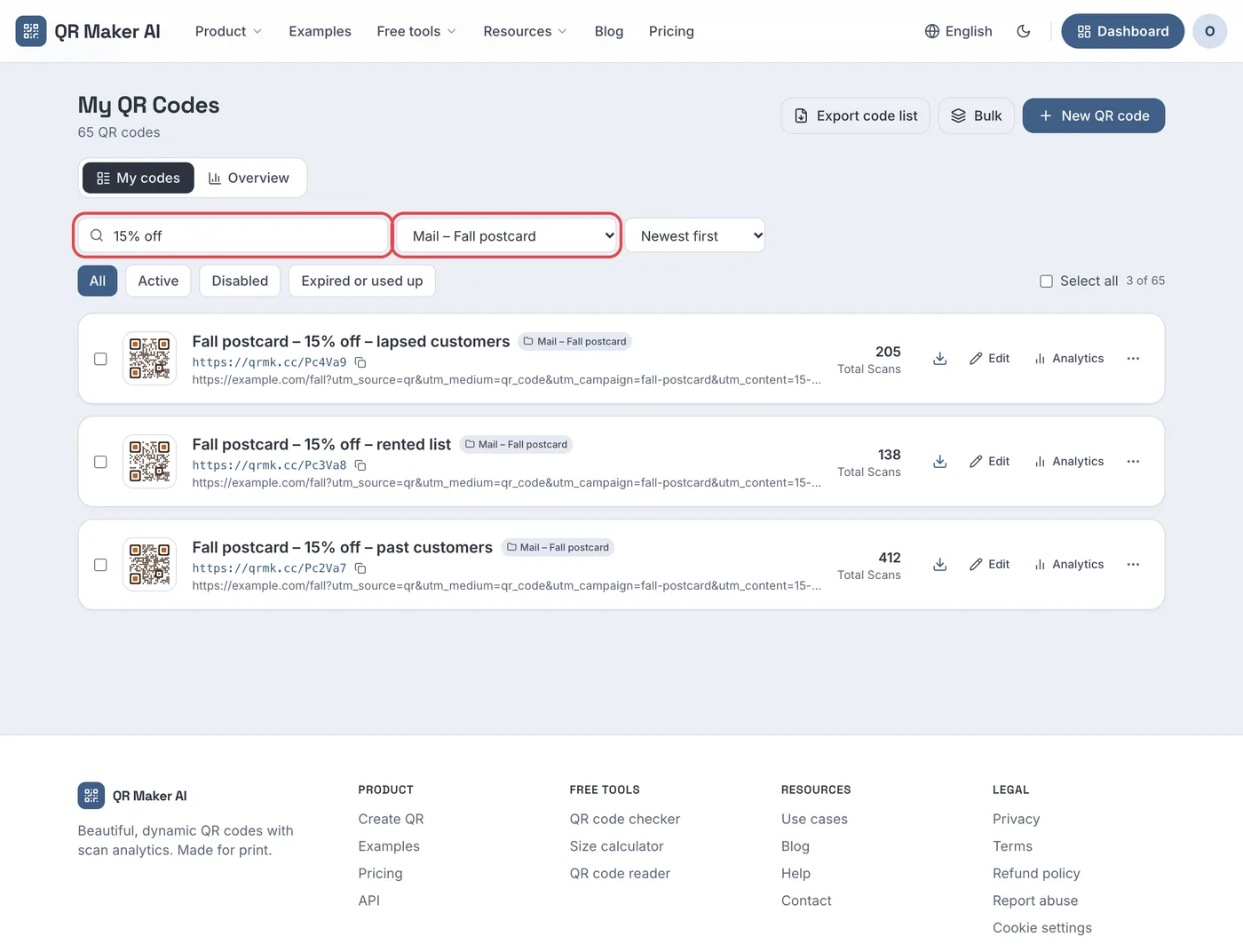
A practical split: one folder per campaign or client, and the four-part name for each code inside it. For chains, the multi-location setup guide shows the same idea applied to branches.
Which plan you need
Naming, folders, search, sort and the UTM helper have no plan check in the code, so they work on every plan. What changes is how many dynamic codes you can keep active. Prices as of November 2026:
| Free | Pro | Business | |
|---|---|---|---|
| Name, folder, search and sort codes | Yes | Yes | Yes |
| UTM tag helper in the editor | Yes | Yes | Yes |
| Active dynamic codes | 3 | Unlimited | Unlimited |
| Tracked scans per month | 500 | Unlimited | Unlimited |
| Price | $0 | $3.99/month or $34.99/year | $29/month or $279/year |
If you run more than three placements at once, the free plan runs out first; see pricing for the full comparison.
FAQ
What is a good naming convention for QR codes?
Use campaign, placement, location and date in that order, such as Winter menu – flyer – Café King St – 2026-12. Keep one separator, a fixed list of placement words and a year-first date, and use the lowercase campaign part as the UTM campaign.
Should the QR code name match the UTM campaign?
Yes. Google Analytics treats UTM values as case sensitive and asks you to keep them consistent with your internal names, so copying the campaign part of the code name into utm_campaign keeps both lists in step.
Can I rename a QR code after printing?
Yes. The name is a label in your account and is not encoded in the pattern, so renaming does not change the printed code.
Is dashboard search case sensitive?
No. Dashboard search ignores case, but Google Analytics treats UTM values as case sensitive, which is why the UTM values stay lowercase even when the code name does not.
Sources
- Google — URL builders: Collect campaign data with custom URLs. Analytics Help, undated. Accessed 5 November 2026.
- Google — Traffic-source dimensions, manual tagging, and auto-tagging. Analytics Help, undated. Accessed 5 November 2026.
- IETF — RFC 3986: Uniform Resource Identifier (URI): Generic Syntax. Published January 2005. Accessed 5 November 2026.
- W3C Internationalization — Date formats. Last updated 22 January 2016 (page metadata). Accessed 5 November 2026.
- IETF — RFC 3339: Date and Time on the Internet: Timestamps. Published July 2002. Accessed 5 November 2026.