Track Trade Show QR Codes and Capture Booth Leads
On this page
At a trade show, a QR code has three jobs: tell you which sign, flyer or demo station people scanned, get the visitor's contact details while they are interested, and keep working after the show without pointing at an expired offer. One code cannot do all three alone, but a small setup can.
This guide uses three QR Maker AI features: placement tags on a dynamic code, a mobile page with a lead form (Biz Pages, included in Business), and destination changes after the event. It ends with what to do with the leads, including the US email rules for following up.
Facts checked on 22 October 2026.
The setup at a glance
| Booth item | What the code opens | How you read the result |
|---|---|---|
| Back wall banner, table sign, brochure | Your product page, via one dynamic code with a different ?s= tag per item | Placement chart in the code's analytics |
| "Leave your details" card at the demo station | A Biz Page with a lead form and a save-contact button | Leads list and block clicks in the page's stats |
| Staff badges | The same Biz Page or a personal contact page | Block clicks |
Step 1: one code, one tag per booth item
Create a dynamic code for the page you want visitors to see, then print a slightly different link on each item: https://qrmk.cc/AbC123?s=banner, ?s=table, ?s=brochure. Everything after the question mark (up to any #) is the query, which RFC 3986 describes as data that, together with the path, identifies the resource. The redirect ignores it for the destination and records it as the placement, so all items lead to the same page while the Placement chart counts each one (placement tracking guide).
Tags can use letters, digits, hyphens and underscores, up to 32 characters, and are stored in lowercase. To make each image, paste the tagged link into the generator and use Download, not Save QR Code: the image holds your tracked short link, so scans still count, and a saved dynamic code is not allowed to point at another short link.
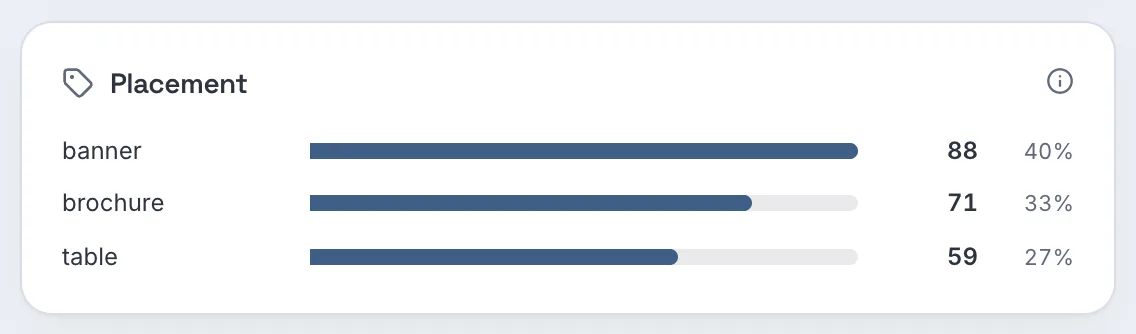
Screenshot from a demo account with sample data.
Also tag the destination for your website analytics. Google Analytics asks for utm_source, utm_medium and utm_campaign on every tagged link, and the values are case sensitive (Google Analytics Help), for example utm_source=expo2026&utm_medium=booth&utm_campaign=spring_launch.
Step 2: a lead form visitors can fill in on their phone
A lead form on a mobile page works from any visitor's phone:
- Open Biz Page in the menu, click New Biz Page, and add blocks: a Custom link to the product sheet (set as the main button), Save contact with your sales contact, a Lead form asking for name and email, and a Custom link to book a meeting.
- Save, then click Generate QR and download the code for the demo-station card. A Biz Page code is a static code with the page address in it; you edit the page, not the code (Biz Page tutorial).
- Each submission is emailed to you and listed under Leads in the page's stats. Notification emails stop after 20 in 24 hours per account, but every lead is still saved, so on a busy day check the list rather than your inbox.
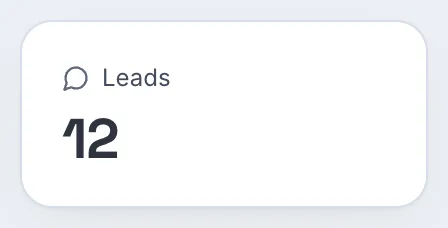
Put the reason to scan on the card: "Scan to get the spec sheet and a follow-up call" tells people what they give and what they get.
Step 3: show hours, and after the show
Smart routing on Pro and Business can send scans to a different page during set hours, for example a "visit us at booth 214 now" page during opening hours. Two details make or break this:
- Hours are in UTC. Convert the show's local opening hours, and remember daylight saving time: NIST notes that in 2026 US daylight saving time runs from March 8 to November 1 (NIST). The same local opening hours fall one hour apart in UTC on either side of those dates.
- A time rule repeats every day. It has no end date, so remove it or change it when the show ends (routing tutorial).
After the show, change the main destination to a "Thanks for visiting" page with the recording or the offer, so every brochure that leaves the hall still opens something current. For a show-only discount, set an expiry date so the offer stops on time.
Step 4: hand clean leads to sales
- Export the leads with Export CSV on the Biz Page stats and import them into your CRM.
- Check traffic by hour. On Business, the scan CSV of the booth code lists each scan's local time when its time zone is known; a pivot by hour shows when the booth was busiest, useful for staffing next time (export guide).
- Follow the email rules. In the US, the FTC's CAN-SPAM guide requires a clear way to opt out, says you "must honor a recipient's opt-out request within 10 business days", and requires a valid physical postal address in every marketing email (FTC). Other countries have their own rules. This is not legal advice.
Before the doors open, scan every printed item once with an iPhone and an Android phone. Apple's instruction is to open Camera and "hold your device so that the QR code appears, then tap the link to open the content" (Apple Support). If you can, test once more under the hall's lighting during setup.
Which plan you need
| What you want | Free | Pro | Business |
|---|---|---|---|
| Dynamic code with placement tags | Yes (3 active codes, 500 tracked scans a month) | Yes, unlimited | Yes, unlimited |
| Time-of-day routing, expiry date | No | Yes | Yes |
| Biz Page with lead form, leads export, no footer | No (Biz add-on: $2.99 a month) | No (Biz add-on) | Included |
| Scan CSV export with local time | No | No | Yes |
| Price as of October 2026 | $0 | $3.99 a month or $34.99 a year | $29 a month or $279 a year |
A busy show can pass 500 scans in a day; on the Free plan, codes keep redirecting past that but stop counting until the next month. The monthly Business plan starts with a 14-day free trial for new customers; a card is required. See the trade shows page and the pricing page.
FAQ
How do I know which booth sign got the most scans?
Print the same dynamic code with a different ?s= tag on each sign. The code's Placement chart counts scans per tag.
Can a QR code collect a visitor's contact details?
Yes, if it opens a page with a form. A Biz Page lead form sends you each submission and keeps a list you can export.
Does a booth QR code validate tickets or badges?
No. It opens a link. Ticket and badge validation stays with the organizer's system.
What should the booth QR code open after the event?
Change the destination to a follow-up page, such as a recording or a post-show offer. Printed brochures then open something current.
Sources
- IETF — RFC 3986: Uniform Resource Identifier (URI): Generic Syntax. Published January 2005. Accessed 22 October 2026.
- Google — URL builders: Collect campaign data with custom URLs. Analytics Help, undated. Accessed 22 October 2026.
- NIST — Daylight Saving Time Rules. Updated 9 February 2026. Accessed 22 October 2026.
- Federal Trade Commission — CAN-SPAM Act: A Compliance Guide for Business. Published August 2023, edited January 2024. Accessed 22 October 2026.
- Apple — Scan a QR code with your iPhone or iPad. Apple Support, published 14 September 2026. Accessed 22 October 2026.