How to Make a QR Code Expire or Stop After N Scans
On this page
A printed QR code has no expiry date of its own: the pattern keeps decoding for as long as the print survives. What can expire is the link inside it. With a dynamic code, the link points to a short URL that you control, so you can tell it to stop after a date or after a set number of scans. After that, a scan shows a "Link Not Found" page instead of your offer.
In QR Maker AI both limits sit in the code's Access control settings, next to the password option. They are part of Pro and Business. This guide shows how to set them, what exactly they count, and where a plain limit is the wrong tool.
Facts checked on 22 October 2026.
Good uses for an end date or a scan cap
| Situation | Setting | Why |
|---|---|---|
| Flyer for a weekend sale | Expiry date: the last day of the sale | Old flyers stop showing a price you no longer honor |
| Event program that links to the live schedule | Expiry date: a week after the event | The code stops instead of opening a stale page |
| "First 200 scans get a free drink" | Maximum scans: 200 | The offer stops by itself |
| Sample or preview link sent to a small group | Maximum scans plus a password | Limits how far a forwarded code travels |
If you only want the code to open something else after the event, you do not need a limit: change the destination instead, and every printed copy follows (how dynamic codes work).
Step-by-step: set an expiry date or a scan cap
- Save a dynamic URL code in the generator. Limits can only be added to a saved code.
- On the dashboard, click the pencil icon (Edit) on the code and open Settings in the editor's side menu.
- Under Access control, set an Expiry date, a number in Max scans, or both. Leave a field blank for no limit; the hint under the fields reads "The code stops working past the date or scan cap."
- Click Save QR Code.
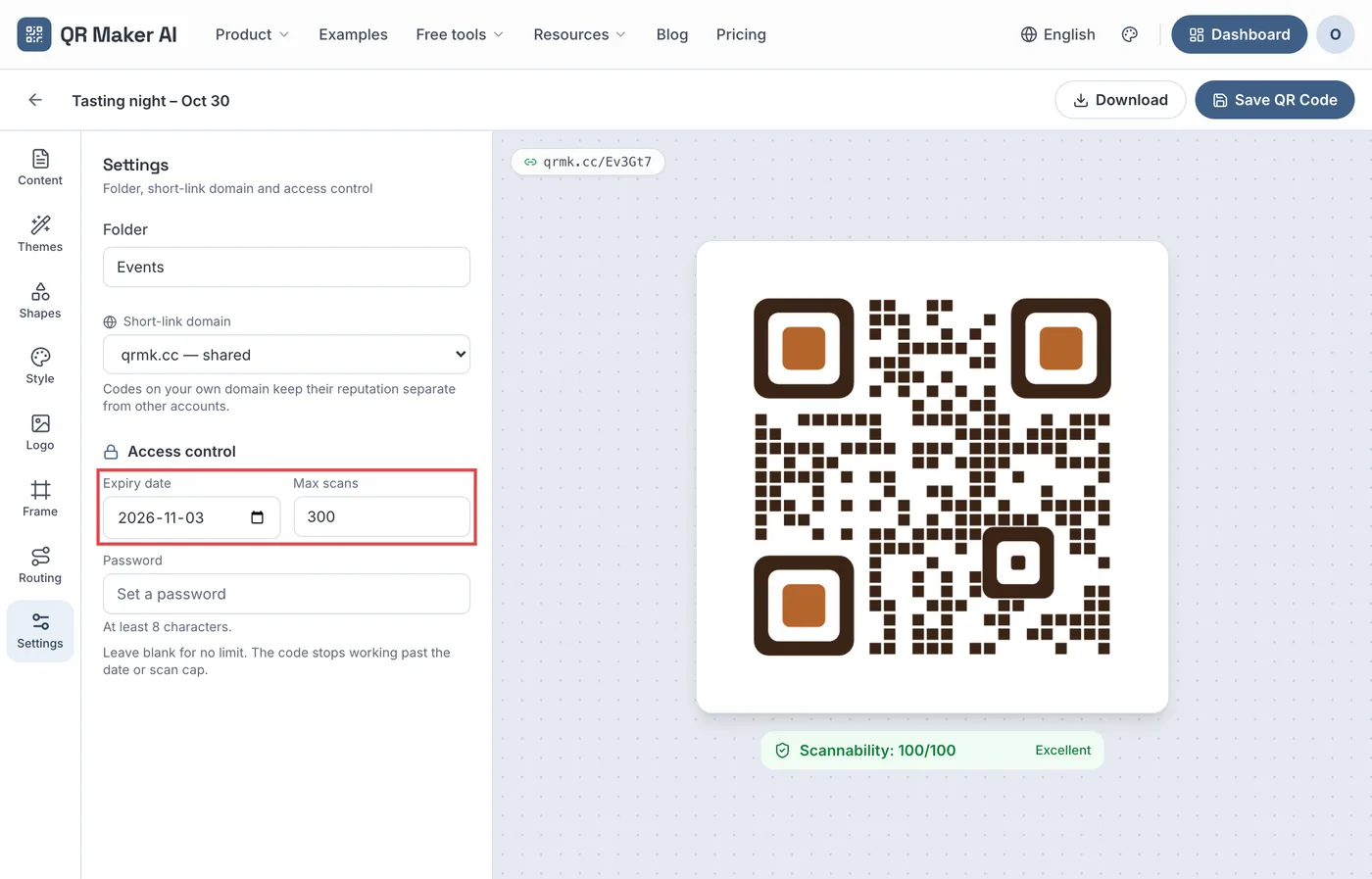
Screenshot from a demo account with sample data.
Two details from the editor's code are worth knowing before you print:
- The code stops at the end of the chosen day, at 23:59:59 in the time zone of the browser you saved it from. If your team works across time zones, save it from the time zone your customers are in, or pick the next day.
- Dates can be up to 10 years ahead, and the scan cap can be any whole number from 1 to 100,000,000.
What the scan cap counts
The cap is compared with the code's running scan total, the same number the dashboard shows as Total Scans. That has three consequences:
- It counts scans since the code was created, not since you set the cap. A code that already has 142 scans and a cap of 300 has 158 left.
- It counts scans, not people. One customer who scans the same flyer three times uses three. For "first 200 customers", read it as "first 200 scans".
- Bots and link previews do not count. Crawlers and preview bots are recorded separately and are not added to the total, so they cannot use up the cap. Neither do previews that only ask for the page headers.
The total is updated just after each redirect, so treat the cap as approximate by a few scans: two people scanning in the same moment can both get through on the last slot.
What people see when the code has stopped
A scan after the end date or the last allowed scan gets a page titled Link Not Found: "This QR code link has expired, been disabled, or never existed. Please check the original QR code." On the shared qrmk.cc domain the page also has a "Create Your Own QR Code" button. On a Business custom short-link domain the same page carries no promotion, so a finished coupon does not advertise another company.
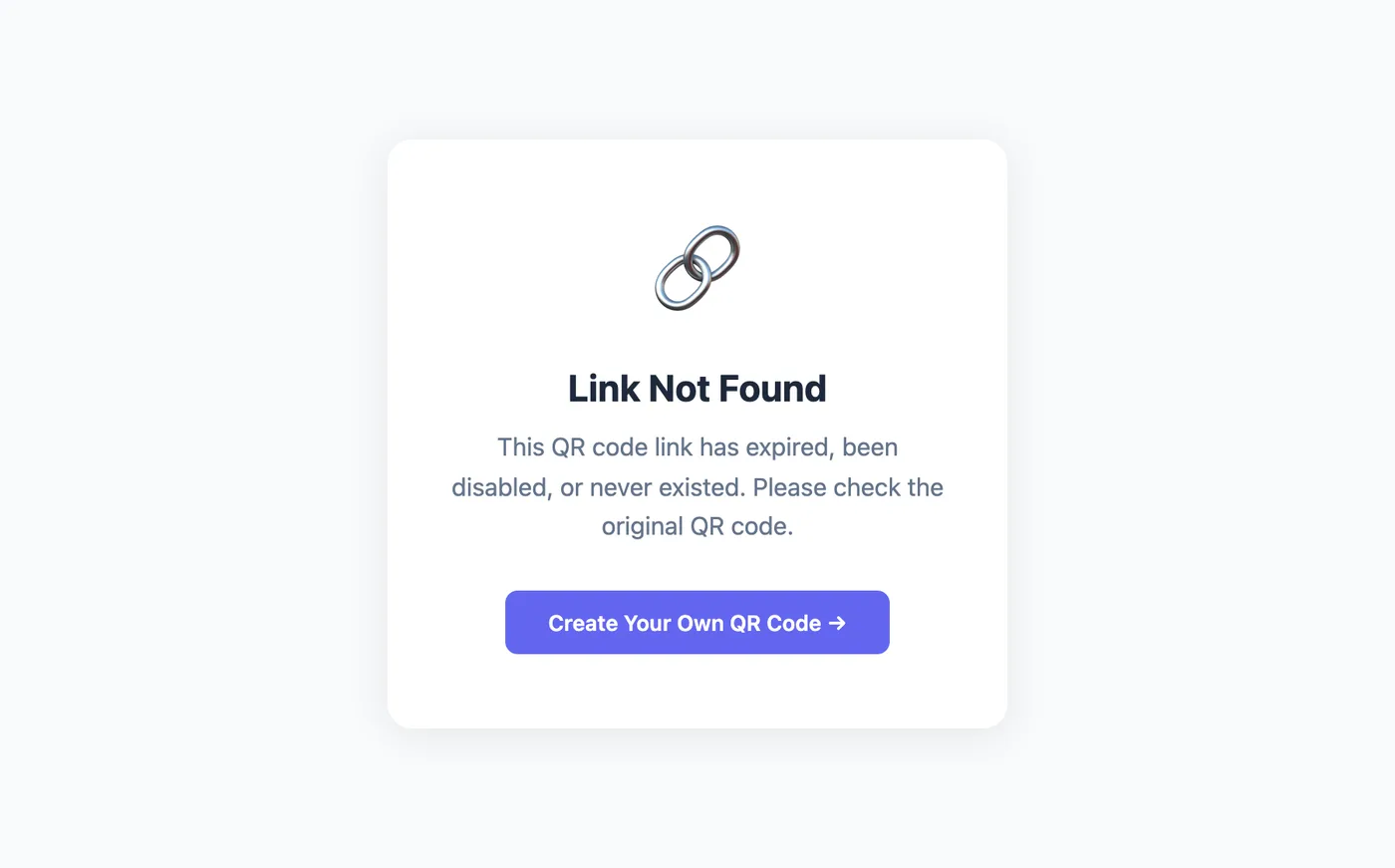
The page is served with HTTP status 404. RFC 9110 describes 404 as not saying "whether this lack of representation is temporary or permanent", which fits: you can reopen the code at any time by moving the date or raising the cap and saving. Because only the short link stops, nothing about the destination page changes. Google says indexed URLs that return a 4xx status are removed from its index (Google's crawler documentation), but that concerns the URL that returns the error, here the short link, not your own page.
Where an expiring code is the wrong tool
Gift cards and stored value. A code that opens a balance of money is not a coupon. In the US, Regulation E generally prohibits selling a gift certificate, store gift card or general-use prepaid card with an expiration date unless, among other conditions, the underlying funds expire no sooner than five years after the card is issued or last loaded, with exclusions for items such as promotional gift cards and paper-only certificates (12 CFR 1005.20 on eCFR). Do not use a QR expiry date to shorten that. This is not legal advice; check the rules where you sell.
Countdowns that are not true. The EU's Unfair Commercial Practices Directive lists, among practices that are always unfair, "falsely stating that a product will only be available for a very limited time" to push an immediate decision (Directive 2005/29/EC, Annex I, point 7). If the flyer says the offer ends Sunday, set the date to Sunday and honor it.
Tickets and one-per-person offers. A printed code is the same for everyone and can be photographed and passed on. Ticketing systems handle this differently; Ticketmaster's UK help page, for example, says that when an order has a barcode with a moving line, the mobile tickets have "a unique barcode that automatically refreshes every 15 seconds for fraud and counterfeit protection" (Ticketmaster UK). A scan cap on a shared code does not validate individual tickets, and QR Maker AI does not offer ticket validation.
Which plan you need
| What you want | Free | Pro | Business |
|---|---|---|---|
| Expiry date and maximum scans | No | Yes | Yes |
| Password on the same code | No | Yes | Yes |
| Expired page without our promotion | No | No | Yes, on your custom domain |
| Price as of October 2026 | $0 | $3.99 a month or $34.99 a year | $29 a month or $279 a year |
The monthly Business plan starts with a 14-day free trial for new customers; a card is required. Expiry dates and scan caps cannot be set through the API; they live in the web editor. See all plans on the pricing page, and for coupon ideas that work with a dated code, the coupons and discounts guide.
FAQ
Do QR codes expire on their own?
No. The printed pattern keeps working. A dynamic code stops when its link is set to stop, the code is disabled or deleted, or the service behind it stops.
Can I extend an expired QR code?
Yes. Edit the code, move the expiry date or raise the cap, and save. The same printed code works again from the next scan.
Does one person scanning twice use two of the scans?
Yes. The cap counts scans, not people. Bots and link previews are not counted.
Can I see on the dashboard which codes have a limit?
Not on the code list. Open a code's Settings to see its expiry date and scan cap; the dashboard shows its total scans.
Sources
- IETF — RFC 9110: HTTP Semantics. Published June 2022. Accessed 22 October 2026.
- Google for Developers — How HTTP status codes affect Google's crawlers. Last updated 4 February 2026. Accessed 22 October 2026.
- eCFR — 12 CFR 1005.20: Requirements for gift cards and gift certificates. Up to date as of 20 October 2026. Accessed 22 October 2026.
- EUR-Lex — Directive 2005/29/EC (Unfair Commercial Practices Directive). Published 11 June 2005. Accessed 22 October 2026.
- Ticketmaster UK — Why do my tickets have a moving barcode?. Undated. Accessed 22 October 2026. (vendor data)