How to Make a Character QR Code With 福, 복, あ or A
On this page
A character QR code is an ordinary QR code with one large character, such as 福, 복, あ or the letter A, drawn underneath its dots. It can still scan because every module keeps a dark or light dot at its center while the character shows through the gaps, the halftone idea explained in How Artistic QR Codes Still Scan. In the QR Maker AI editor you type the character under Shapes → Fine-tune → Your own character, pick a font and a color, then test before you download or save.
Facts checked on 5 November 2026.
What a character QR code is
The character is decoration, not data. The code still holds your link or text; the character sits in a layer behind the modules, drawn the same way as the built-in 福 pattern, and the modules on top are drawn as dots so the character shows between them.
A code with your own character always uses error correction level H. DENSO WAVE's QRcode.com puts level H at approximately 30% and expresses that rate as a ratio of the total codewords, where one codeword is 8 bits. QR Code Error Correction Levels Explained covers what that means in practice.
Our server fetches only that one character from Google Fonts with the API's text= parameter, which requests a font file optimized for the listed characters. Your code's style stores the character's vector outline, not the font file.
How to add your own character, step by step
- Enter the content. Open the editor and fill in what the scan should open. Keep Website URL if you want to save a dynamic code whose destination you can change later; other content types can only be downloaded as static codes.
- Open Shapes, then Fine-tune. Below the Pattern dropdown you will find the Your own character box.
- Type one character. If you type more, only the first is used. A complete Korean syllable counts as one: Unicode encodes 11,172 modern Hangul syllables in its Hangul Syllables block, and 복 is one of them.
- Pick a font. Font buttons appear under the box, showing only the fonts the editor offers for that script. Click one and the preview redraws. If a font lacks the character, you see "This font doesn't include that character. Try another font."
- Pick a pattern color. Pattern color offers ten preset swatches and no custom color picker.
- Check, then download or save. Read the Scannability score under the preview, then use Download or Save QR Code. If the name field is empty when you save, the editor asks you to name the code first.
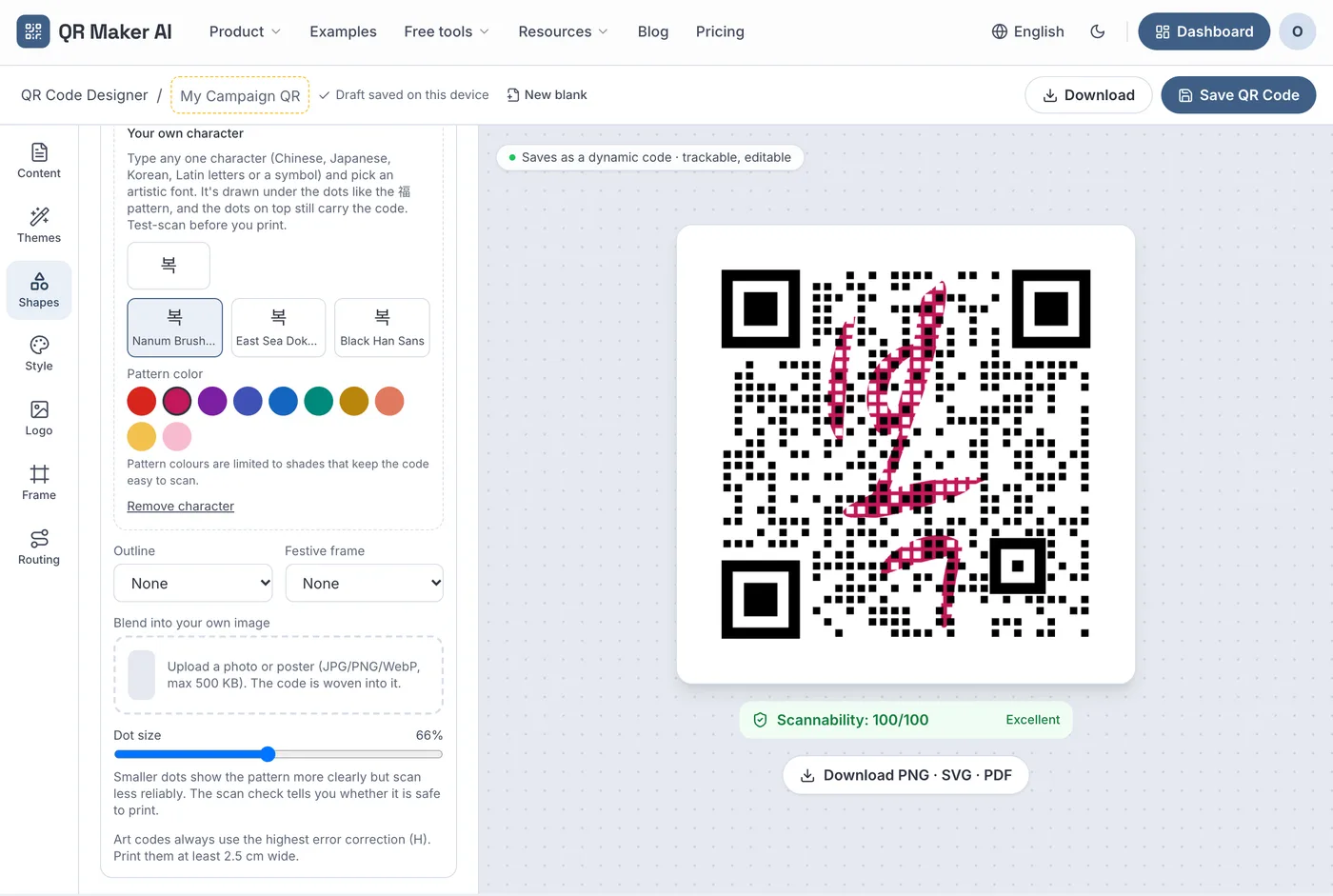
Screenshot from a demo account with sample data.
Your own character replaces a built-in pattern such as 福, but works with Outline, Festive frame and Dot size. Remove character takes it out.
Which character and font to pick for each script
The editor sorts characters into four groups. All 13 fonts come from Google Fonts.
| Script | Example | Fonts offered | Notes |
|---|---|---|---|
| Chinese characters (Han, also used as Japanese kanji) | 福 | Ma Shan Zheng, Zhi Mang Xing, Long Cang, Liu Jian Mao Cao, Yuji Syuku, Yuji Boku | Google Fonts says Ma Shan Zheng is reminiscent of fonts used for "yinglian", blessings posted beside an entryway |
| Japanese kana | あ | Yuji Syuku, Yuji Boku | The Yuji fonts digitize the handwriting of calligrapher Yuji Kataoka |
| Korean Hangul | 복 | Nanum Brush Script, East Sea Dokdo, Black Han Sans | Black Han Sans emphasizes square shapes for headlines |
| Everything else (Latin letters, digits, symbols) | A, & | Nanum Brush Script, East Sea Dokdo, Black Han Sans, Pacifico, UnifrakturMaguntia, Abril Fatface, Lobster | Pacifico was inspired by 1950s American surf culture |
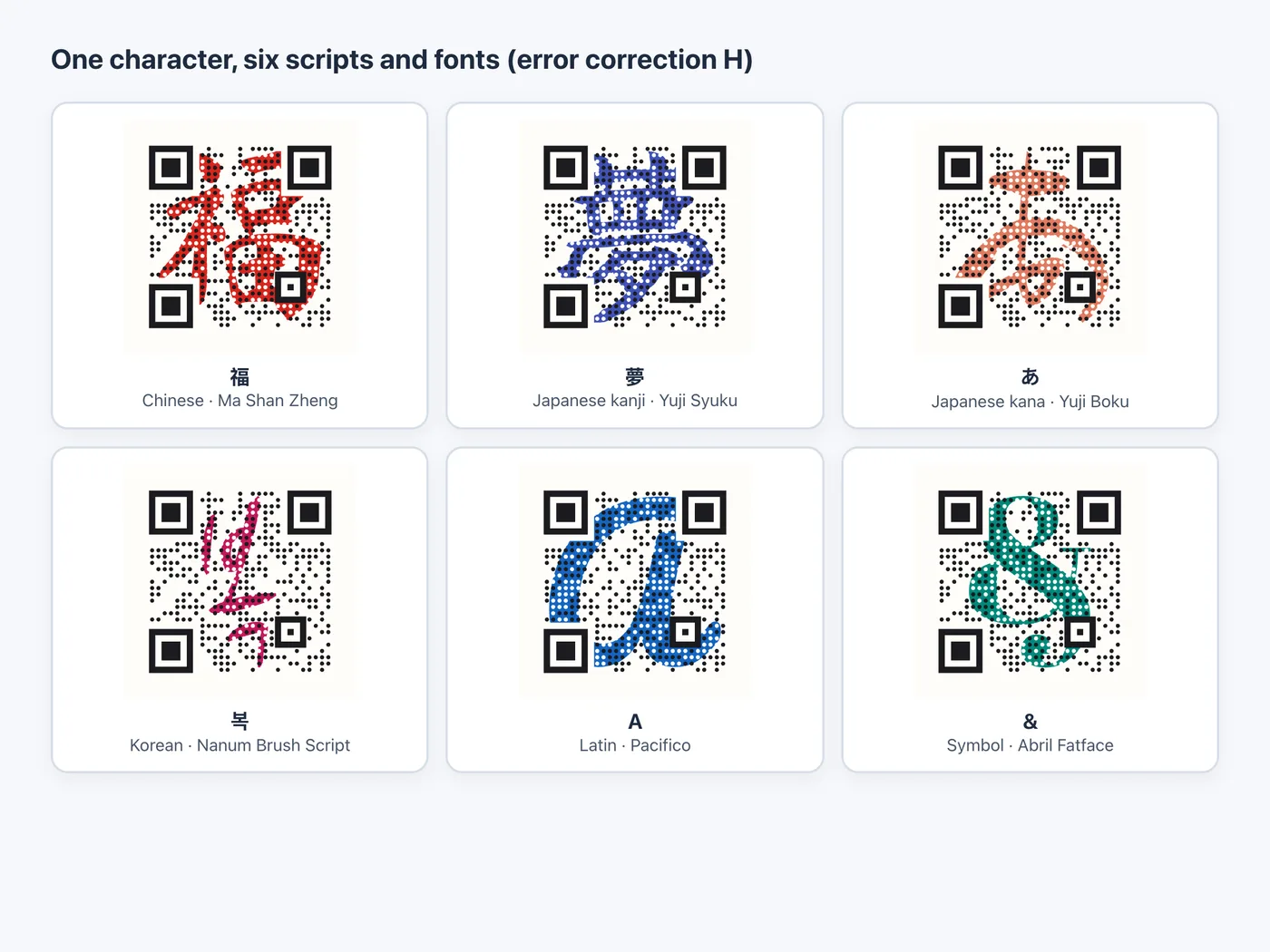
A Han character can be missing from a font built for another language. Google Fonts lists Ma Shan Zheng with a simplified Chinese subset and Yuji Syuku with a Japanese subset, so if one font lacks the character, try another.
China's Ministry of Culture and Tourism describes pasting 福 during the Spring Festival as a long-standing folk custom. The South Korean government's Korea.net gives the New Year greeting "Saehae bok mani badeuseyo" as "May you receive lots of luck in the new year". More seasonal ideas are in Holiday QR Code Ideas and the Chinese New Year guide.
Why the pattern colors are limited
The editor's note reads: "Pattern colours are limited to shades that keep the code easy to scan."
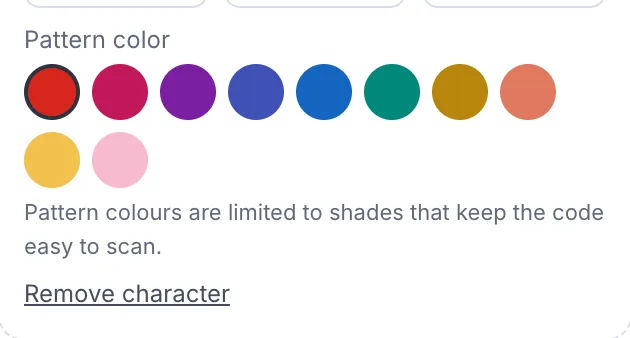
The limit is about brightness. W3C's WCAG 2.2 defines relative luminance on a scale normalized to 0 for darkest black and 1 for lightest white. By our calculation with its formula, the presets range from 0.078 (purple) to 0.601 (pale pink).
Black was left out on purpose. We rendered one 福 code holding a 59-character web address in 11 pattern colors, two dot sizes and widths of 400, 200 and 150 pixels, and decoded each file with the open-source jsQR and zxing-wasm decoders. Pure black and a near-black failed in jsQR at 400 pixels with the larger dots, though ZXing read them; a deep green failed once in jsQR at 150 pixels. Red, blue, purple, gold, pink and light yellow decoded in both every time. Our reading is that a near-black pattern leaves the light dots less contrast with their surroundings; the halftone guide explains why the dots carry the data.
Test the code before you print it
- Read the Scannability score. It decodes the rendered design in your browser at several sizes. It cannot judge paper, ink or a phone's camera.
- Run the downloaded PNG through the QR code checker. It runs in your browser without uploading the image and checks contrast, the quiet zone and decoding at reduced sizes.
- Print it at the real size. The editor's own note for art codes is to print them at least 2.5 cm wide. Use the size calculator for codes read from farther away.
- Scan the print with at least two phones, such as an iPhone and an Android phone, in the light where the code will hang.
Before release we decoded 10 characters (爱, 龙, 寿, 夢, あ, 복, 사, A, M and &) at 400, 200 and 150 pixels wide; both decoders read all of them. Decoder tests are not a substitute for scanning with real phones, and no design is certain to scan everywhere.
A saved dynamic code lets you change its destination after printing, but a new character, font or color means a new image and a reprint.
Can you use these fonts commercially?
All 13 fonts are released under the SIL Open Font License, Version 1.1; the license file in the Google Fonts repository says so for each, for example Nanum Brush Script's OFL.txt. The official OFL text lets anyone use, modify and redistribute the fonts free of charge, subject to its conditions. One condition is that the font may not be "sold by itself"; another says the requirement for fonts to remain under the license "does not apply to any document created using the Font Software."
Asked whether the fonts can be used for print publications, logos or other graphics, the OFL FAQ answers "Yes. You are very welcome to do so." It adds that you remain the author of the resulting graphic and that acknowledgement is not required. This is not legal advice; read the license yourself if your use is unusual.
Which plan you need
Built-in patterns such as 福 are free. Your own character is a Pro feature; everyone can try it in the preview.
| What you want | Free | Pro | Business |
|---|---|---|---|
| Type a character, try fonts and colors, see the preview | Yes | Yes | Yes |
| Download or save a code with your own character | No (preview only) | Yes | Yes |
| SVG (vector) and PDF downloads | No | Yes | Yes |
| Price as of November 2026 | $0 | $3.99/month or $34.99/year | $29/month or $279/year |
The PDF contains a bitmap, so send SVG when a printer wants vector art. Compare plans on the pricing page.
FAQ
Can a QR code have a Chinese character on it and still scan?
It can, when the character sits under the dots and each module keeps a clear dark or light dot at its center. The decoders we tested read all 10 sample characters at three sizes, but test your own printed code on real phones.
Why can't I choose black for the character?
In our decoder tests, black and near-black patterns failed in one decoder at a normal size, so the editor offers ten presets that avoid black and white.
Can I use a character QR code on products I sell?
The 13 fonts are under the SIL Open Font License, whose FAQ says they may be used to create logos and other graphics. This is not legal advice.
Can I change the character after printing?
No. Printed codes keep their look. If the code is dynamic, you can still change where it points without reprinting.
Sources
- DENSO WAVE — Error correction feature. QRcode.com, undated (level table shown as an image on the page). Accessed 5 November 2026.
- Google — CSS API update (Google Fonts css2 API). Google for Developers, undated. Accessed 5 November 2026.
- Unicode Consortium — The Unicode Standard, Version 18.0, Chapter 18: East Asia. Section 18.6.5, Hangul Syllables. Accessed 5 November 2026.
- Google Fonts — Ma Shan Zheng description. google/fonts repository, undated. Accessed 5 November 2026.
- Google Fonts — Yuji Syuku description. google/fonts repository, undated. Accessed 5 November 2026.
- Google Fonts — Black Han Sans description. google/fonts repository, undated. Accessed 5 November 2026.
- Google Fonts — Pacifico description. google/fonts repository, undated. Accessed 5 November 2026.
- Google Fonts — Ma Shan Zheng metadata. google/fonts repository, date added 18 March 2019. Accessed 5 November 2026.
- Google Fonts — Yuji Syuku metadata. google/fonts repository, date added 27 September 2021. Accessed 5 November 2026.
- Ministry of Culture and Tourism of the People's Republic of China — The Character "Fu": Decoding the cultural symbols for Spring Festival. Travel China, published 10 February 2026. Accessed 5 November 2026.
- Korea.net (Ministry of Culture, Sports and Tourism, Republic of Korea) — Differences in how both Koreas celebrate Lunar New Year. Kang Gahui and Kim Hwaya, published 25 January 2020. Accessed 5 November 2026.
- W3C — Web Content Accessibility Guidelines (WCAG) 2.2. W3C Recommendation, 12 December 2024. Accessed 5 November 2026.
- jsQR project — README. Undated. Accessed 5 November 2026.
- zxing-wasm project — README. Undated. Accessed 5 November 2026.
- Google Fonts — Nanum Brush Script OFL.txt. google/fonts repository, undated. Accessed 5 November 2026.
- SIL International — SIL Open Font License, Version 1.1. Version 1.1, 26 February 2007. Accessed 5 November 2026.
- SIL International — OFL-FAQ. Version 1.1-update7, November 2023; page updated 12 January 2026. Accessed 5 November 2026.