QR Codes for Real Estate Signs and Open Houses
On this page
A QR code on a yard sign rider or flyer box lets a passer-by open the listing on their phone without writing down an address. Make it a dynamic code, one per listing and placement, so you can see which sign gets scanned, send the code somewhere useful after the sale, and reuse the sign without reprinting.
This guide shows the setup in QR Maker AI: codes per listing, reading when people scan, a mobile agent page that takes showing requests, and what to change when the home sells.
Facts checked on 26 October 2026.
Do buyers still look at signs?
Some do. In the National Association of REALTORS® 2025 Profile of Home Buyers and Sellers, a survey mailed to recent buyers that drew 6,103 responses from people who bought a primary residence between July 2024 and June 2025, 32% of buyers used a yard sign and 48% used an open house as an information source, and 70% used a mobile or tablet device in their search (NAR, 2025 Profile). On the selling side, among sellers who used an agent, 67% said the agent posted a yard sign and 59% said the agent held an open house (NAR, 2025 Profile).
So the sign is still part of the search, and the person looking at it has a phone in their hand. The QR code connects the two.
Step 1: one dynamic code per listing and placement
A static QR code holds the listing URL itself. A dynamic code holds a short link that redirects to the listing, which is what lets you count scans and change the destination later (dynamic vs static QR codes).
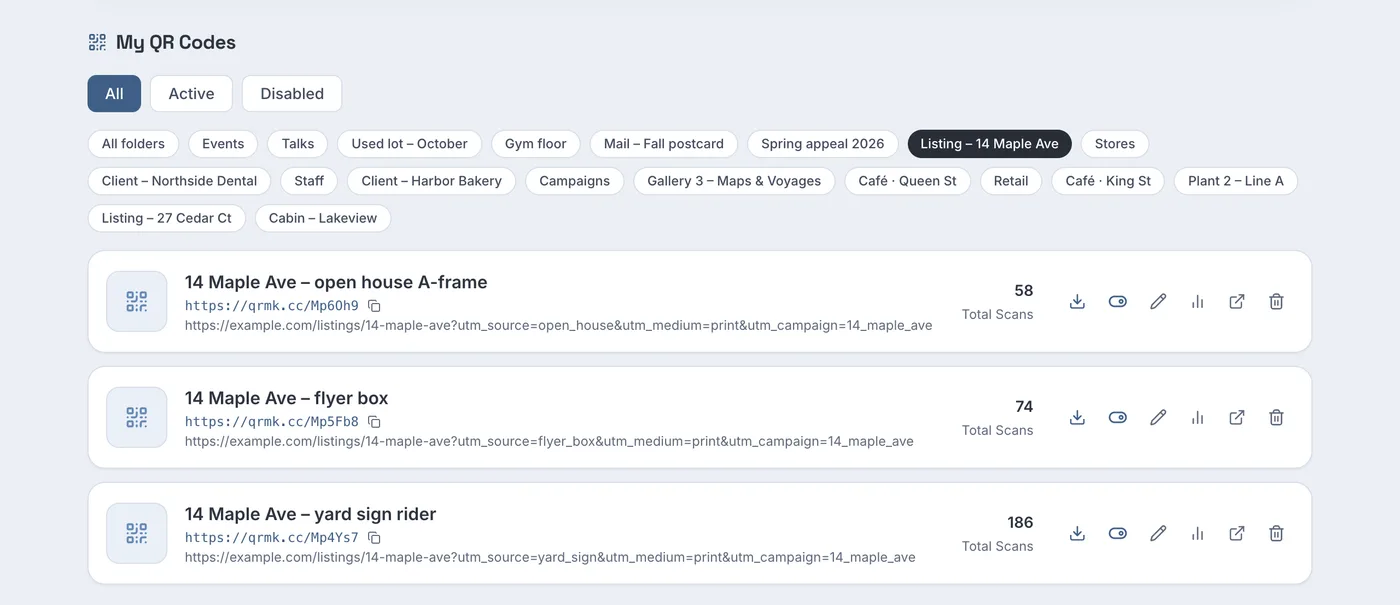
- In the generator, paste the listing page URL and save the code with a name that says where it will hang, such as "14 Maple Ave – yard sign rider".
- Open the code, go to Settings and type a Folder name, for example "Listing – 14 Maple Ave". The dashboard then filters by that folder.
- Repeat for the flyer box and the open house A-frame. Give each destination its own UTM tags so your website analytics separate them too. Google says to always use
utm_source,utm_mediumandutm_campaign, and notes that "Parameter values are case sensitive" (Google Analytics Help).
Screenshot from a demo account with sample data.
The sample listing shows the pattern you would hope for: the yard sign rider has 186 scans, the flyer box 74 and the open house board 58. If a flyer box empties fast but its code gets few scans, people may be taking the paper home rather than scanning on the spot.
Before the sign goes in the ground, scan the printed rider with an iPhone and an Android phone from where a driver or walker would stand. Apple's instruction for the Camera app is to "hold your device so that the QR code appears, then tap the link to open the content" (Apple Support).
Step 2: see when people scan
Each code's analytics page has a When people scan (local time) heatmap: day of week against hour, in the scanner's own local time.
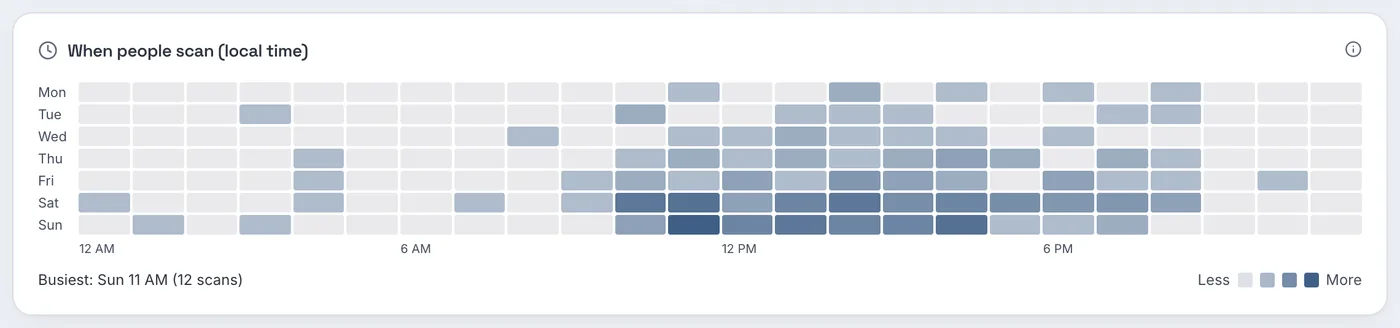
In the sample data the darkest cells are Saturday and Sunday from late morning through the afternoon, and the busiest hour is Sunday 11 AM with 12 scans. If your own sign looks like this, that is when to have your phone on, and it is a reasonable argument for the open house time slot.
Two limits to keep in mind. A scan is not a visit: someone may scan, look at the price and drive on. And the location in the report comes from the network the phone used, down to state or province, not a street, so at most it suggests the scans came from your area, not which block.
Step 3: an agent page that takes showing requests
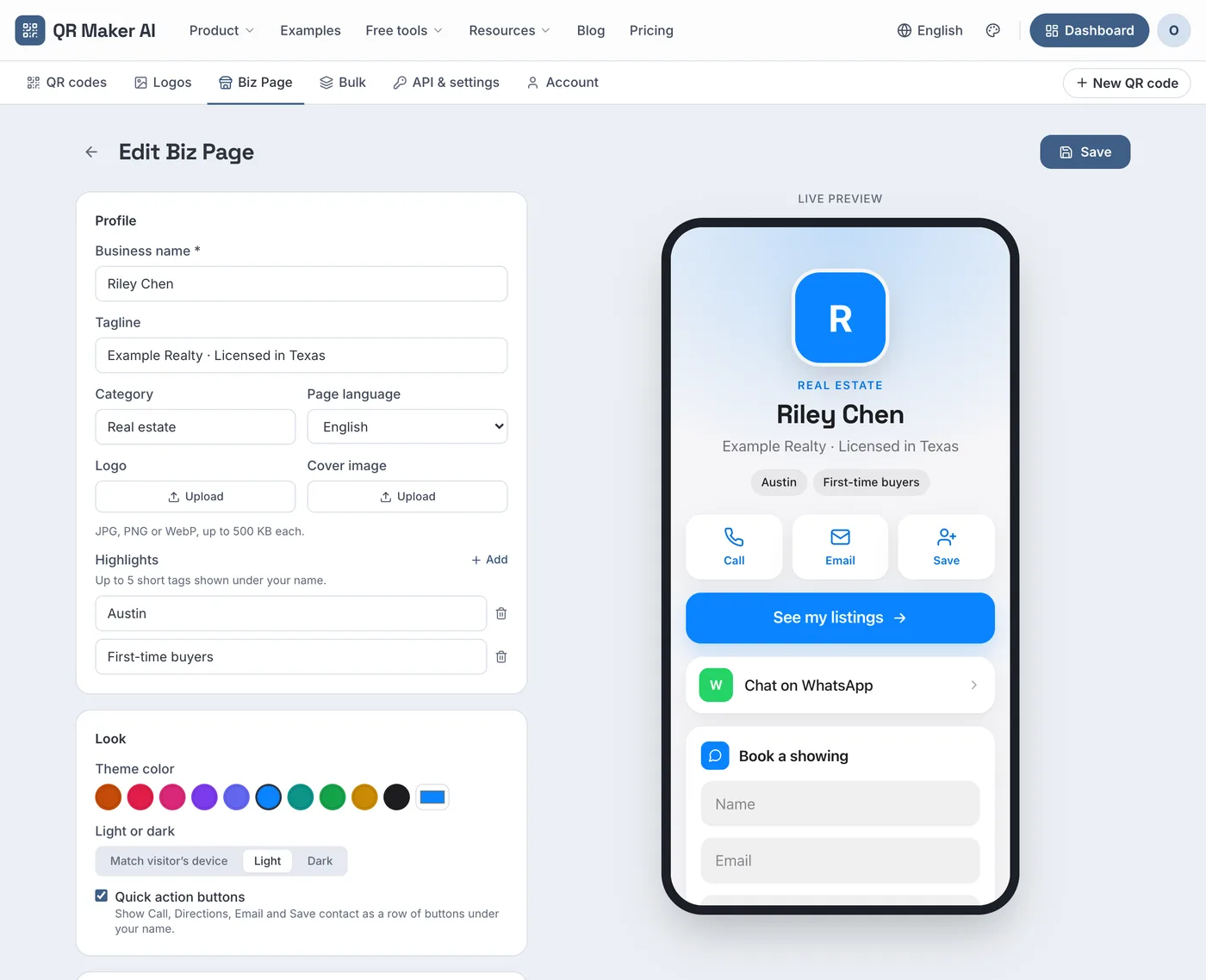
A listing page answers "what is this house"; it does not always make it easy to ask for a showing. A Biz Page is a mobile page you build from blocks, and it can include a lead form.
- Open Biz Page, click New Biz Page and pick the Real estate template under Start from a template. It adds a listings link, call and email buttons, Save contact, WhatsApp, a Google review link and a Lead form; on the free plan it keeps only the first four blocks and no form.
- Fill in your name and, in the tagline, your brokerage. The REALTOR® Code of Ethics, Standard of Practice 12-5, says members shall not advertise listed property in any medium "without disclosing the name of that REALTOR®'s firm" (NAR Code of Ethics 2026). Your state's license rules may ask for more; check them.
- Title the form "Book a showing" and ask only for name, email and phone.
- Save, click Generate QR and download the image for the open house sign-in table. A Biz Page code is a static code that holds the page address; you change the page, never the printed code.
Each request is listed under Leads in the page's stats, with an Export CSV button for your CRM, and emailed to you (up to 20 emails a day).
Under the form the page tells visitors that their details go only to you. Keep it that way. Standard of Practice 12-11 says members who intend "to share or sell consumer information gathered via the Internet shall disclose that possibility" (NAR Code of Ethics 2026). If you plan to pass leads to a lender, collect them somewhere that says so.
When you follow up by email, US rules apply to every commercial message. The FTC's CAN-SPAM guide says you "must honor a recipient's opt-out request within 10 business days" and must include a valid physical postal address (FTC). This is not legal advice.
Step 4: when the home sells
The sign and the flyers outlive the listing. Change where the code goes instead of letting it open a dead page:
- Open the code from the dashboard with the pencil Edit button.
- Under Content, replace the Destination URL with a page that says clearly the home has sold and shows your other active listings nearby.
- Click Save QR Code. The next scan opens the new page.

Make the new page honest. Standard of Practice 12-10 extends the duty to present "a true picture" to "the URLs and domain names they use" (NAR Code of Ethics 2026): a scan from a sold sign should not land on a page that implies the home is still available.
The same rider can go on the next listing. Change the destination and the folder; the code keeps its earlier scans, so use the date range on the analytics page to look at each listing separately.
Which plan you need
| What you want | Free | Pro | Business |
|---|---|---|---|
| Dynamic codes per listing and placement | 3 active codes, 500 tracked scans a month | Unlimited | Unlimited |
| Folders, heatmap, change the destination | Yes | Yes | Yes |
| Agent Biz Page with lead form and leads export | No (Biz add-on: $2.99 a month) | No (Biz add-on) | Included, up to 10 pages |
| Your brokerage's own short-link domain | No | No | Yes, one subdomain |
| Price as of October 2026 | $0 | $3.99 a month or $34.99 a year | $29 a month or $279 a year |
Three active codes cover one listing with three placements. An agent with several listings at once needs Pro; a team that wants its own domain on the code needs Business, which also includes the Biz Page lead form. The monthly Business plan starts with a 14-day free trial for new customers, with a card required. More ideas are on the real estate use case page, and plans are compared on the pricing page.
FAQ
Should a yard sign QR code be dynamic or static?
Dynamic. You can count scans, change the destination when the home sells, and reuse the sign on the next listing without reprinting.
Can a QR code on a sign collect a buyer's contact details?
The code only opens a page. If that page has a form, such as a Biz Page lead form, the buyer can send you their name, email and phone.
What should a QR code on a sold sign open?
A page that says the home has sold and shows your other active listings. Change the destination in the code's edit page; the printed sign stays the same.
Can I see who scanned my sign?
No. You see counts, times, device types and the state or province of the network. Names arrive only if someone fills in a form.
Sources
- National Association of REALTORS® — 2025 Profile of Home Buyers and Sellers (PDF copy hosted by Rhode Island REALTORS®). Survey of buyers who purchased between July 2024 and June 2025, n = 6,103; PDF metadata shows 29 October 2025. Accessed 25 October 2026.
- Google — URL builders: Collect campaign data with custom URLs. Analytics Help, undated. Accessed 25 October 2026.
- Apple — Scan a QR code with your iPhone or iPad. Apple Support, published 14 September 2026. Accessed 25 October 2026.
- National Association of REALTORS® — 2026 Code of Ethics & Standards of Practice. Effective 1 January 2026. Accessed 25 October 2026.
- Federal Trade Commission — CAN-SPAM Act: A Compliance Guide for Business. Published August 2023, edited January 2024. Accessed 25 October 2026.