How Agencies Manage QR Codes for Many Clients
On this page
An agency that prints QR codes for clients carries a long tail of responsibility: the codes outlive the campaign, the client changes their website, and a year later someone asks why the table cards stopped working. The setup decisions made on day one, whose account the codes live in and whose domain they use, decide how painful that is.
This guide covers the two account models that work in QR Maker AI, how to organize codes per client, how to give clients reports without sharing a login, and what to do when a contract ends. Most of it uses the Business plan, which includes team access, embeddable analytics, scan exports, the API and a custom short-link domain.
Facts checked on 22 October 2026.
Decide first: whose account holds the codes
Codes cannot be moved from one account to another, so pick the model before anything is printed.
| Model A: one agency account | Model B: one Business account per client | |
|---|---|---|
| Who pays | The agency, once | Each client |
| Short-link domain | The agency's own (one per account) or the shared qrmk.cc | The client's own subdomain, such as go.clientbrand.com |
| Who edits | The agency account owner | The client's account owner |
| Agency staff access | Owner plus read-only team members | Read-only team member in each client account |
| When the contract ends | Codes stay in the agency's account | Nothing to hand over |
| Best for | Many small clients, short campaigns | Clients with long-lived print (packaging, signage) |
Two limits drive the choice. Each account can use one custom domain, so clients who want their own name on the short link need their own account. And team members are read-only, so in Model B the client's own account owner makes the edits, or the agency requests them.
There is a precedent for getting this wrong with domain names. ICANN warns domain owners that a developer they hired "may have registered the domain name using their own contact details", even when the client paid, and may then be listed as the official registrant (ICANN). The same thing happens with QR codes: if the codes sit in the agency's account, the client depends on the agency to keep them running. Say which model you use in the contract.
Organize codes per client
In Model A, every client shares one dashboard, so naming does the work:
- One folder per client. Set Folder in each code's Settings (up to 50 characters); the dashboard filters by folder.
- Names that sort:
Client – campaign – placement, for exampleHarbor Bakery – spring menu – table card. - Tagged destinations so the client's website analytics show the campaign. Google Analytics asks for
utm_source,utm_mediumandutm_campaignon every tagged link (Google Analytics Help); one campaign name per print run keeps runs apart.
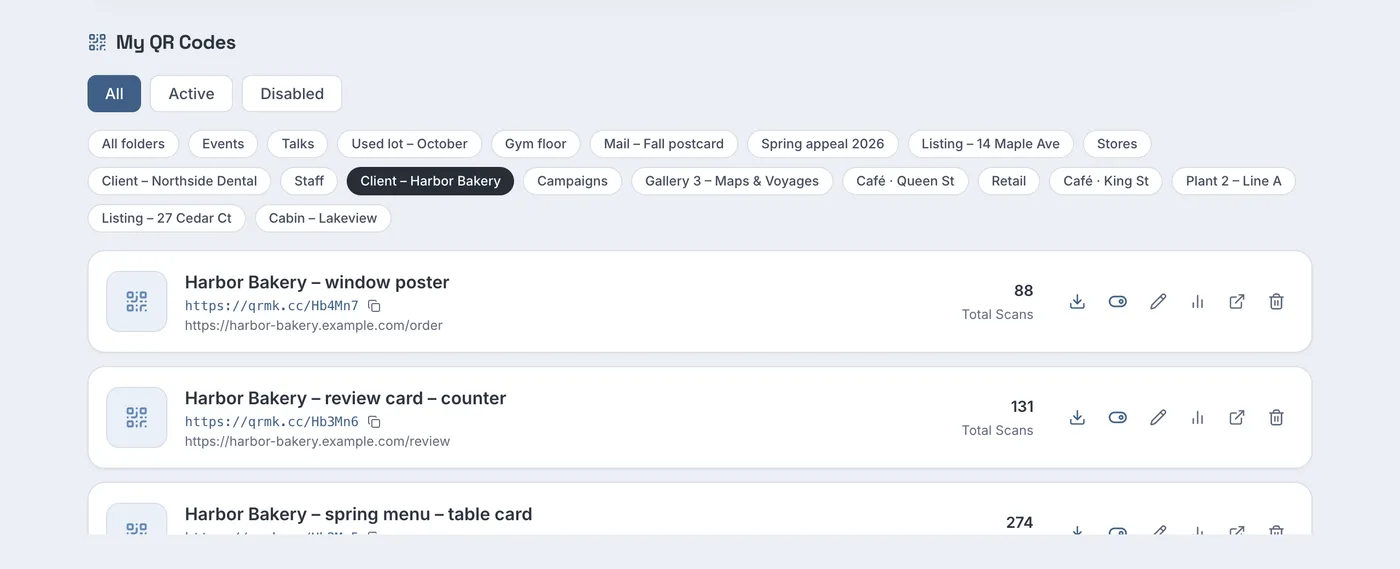
Screenshot from a demo account with sample data.
For a large rollout, the bulk CSV page creates one code per line, and the REST API can create them from your own systems with a client reference in external_id.
Give each person only the access they need
NIST defines least privilege as restricting access "to the minimum necessary to accomplish assigned tasks" (NIST CSRC). In practice:
- Agency staff: invite them as team members (up to 10, read-only). They see every code and its analytics in the account, so in Model A they see all clients.
- Clients in Model A: do not invite them to the team. A team member sees every client's codes. Use the options below instead.
- Your own reporting scripts: a read-only API token can read codes and analytics but cannot change anything. Keep tokens on servers; OWASP's guidance is that "secrets should never be retrievable by everyone and everything" (OWASP). Revoke a token when the person or script that used it leaves.
The sharing analytics tutorial covers team invitations and tokens step by step.
Report to clients without sharing a login
Three ways to show a client their numbers without giving them access to the account:
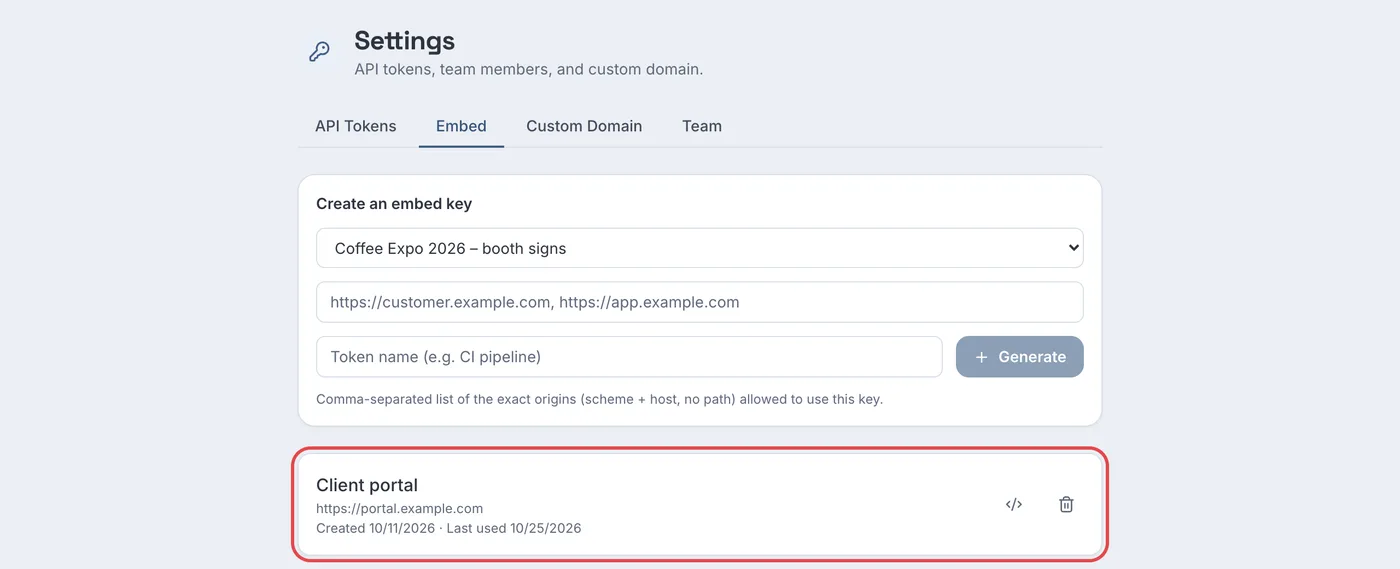
- Embedded analytics. Create an embed key for a client's code and paste the snippet into the client's portal or intranet page. The key works only from the web addresses you list, shows scans, countries, devices and referrers, and never shows the destination or routing rules. An account can have up to 20 keys, one code each.
- A monthly export. On the Business plan, each code's analytics page has Export scans (CSV) with one row per scan; build the client's report in a spreadsheet (export guide).
- An automated report. The API's cross-code summary returns scans and unique visitors per code or per folder for a date range, which is enough to fill a client dashboard in your own reporting tool.
White-label the parts the public sees
Clients' customers see two things: the short link and, if a code is switched off, an error page.
- Short link. With a custom short-link domain, codes read
go.yourbrand.com/…instead ofqrmk.cc/…. In Model A that is the agency's domain; in Model B, the client's. - Error page. A disabled, expired or deleted code on a custom domain shows a plain "Link Not Found" page with no promotion; on the shared domain the same page carries a "Create Your Own QR Code" button.
- Biz Pages for clients without a website have no "Made with QR Maker AI" footer on Business (Biz Page tutorial).
When a contract ends
Printed codes keep working after a contract ends, so plan the exit:
- Model A: agree in writing what happens to the client's codes. The usual options are to keep them running (they cost nothing extra on Business), to point them at a page the client chooses, or to disable them with notice. Codes cannot be transferred to the client's own account.
- Custom domains: if a client's subdomain points at the service and the client stops using it, remove both DNS records. Microsoft's guidance on subdomain takeover notes that "CNAME records are especially vulnerable" when they point at resources that are no longer in use (Microsoft Learn).
- Access: remove the departing client's staff from any team, revoke tokens and delete embed keys made for them.
Which plan you need
| What you want | Free | Pro | Business |
|---|---|---|---|
| Unlimited dynamic codes, folders | 3 active codes, with folders | Yes | Yes |
| Bulk creation, smart routing, password and expiry | No | Yes | Yes |
| Team members (read-only) | No | No | Up to 10 |
| Embedded analytics, scan CSV export, API | No | No | Yes |
| Custom short-link domain, white-label error page | No | No | Yes, one per account |
| Price as of October 2026 | $0 | $3.99 a month or $34.99 a year | $29 a month or $279 a year |
The monthly Business plan starts with a 14-day free trial for new customers; a card is required. See the agencies page and the pricing page.
FAQ
Can I give a client access to only their own QR codes?
Not through the team feature, which shows the whole account. Use an embed key per code, a CSV export, or a separate Business account for that client.
Can I move a client's QR codes to their own account later?
No. Codes stay in the account that created them. If a client may want ownership later, create their codes in their own account from the start.
Can one account use a different custom domain for each client?
No. Each account can use one custom short-link domain at a time.
Do a client's codes stop working if our agency cancels Business?
No. Codes keep redirecting, including codes on your custom domain. Embedded analytics, the API and domain settings pause until the plan is renewed.
Sources
- ICANN — General Questions. Undated. Accessed 22 October 2026.
- Google — URL builders: Collect campaign data with custom URLs. Analytics Help, undated. Accessed 22 October 2026.
- NIST CSRC — least privilege (glossary). Undated. Accessed 22 October 2026.
- OWASP — Secrets Management Cheat Sheet. Undated. Accessed 22 October 2026.
- Microsoft — Prevent dangling DNS entries and avoid subdomain takeover. Updated 20 July 2026. Accessed 22 October 2026.