Donation QR Codes: Track Every Fundraising Channel
On this page
A donation QR code does not take money. It opens your giving page, where your donation platform takes the payment. What the code adds is measurement: with one dynamic code per channel, a nonprofit can see whether the mailed letter, the gala table cards or the library poster brought people to that page, and test which version of the page works better.
This guide sets that up in QR Maker AI for one spring appeal, starting with the part donors care about most: being sure the code is really yours.
Facts checked on 26 October 2026.
Start with trust
Donors are told to be careful, and they should be. The FTC's advice to donors says to donate "by credit card or check. It’s the safest way to donate", and to confirm a charity is registered as tax-exempt in the IRS's Tax Exempt Organization Search before counting on a deduction (FTC). An FTC alert from 27 August 2026 warns that scammers "might impersonate well-known charity organizations" (FTC).
What that means for your printed codes:
- Print your name and web address next to the code, so a donor who prefers to type can go straight to your site.
- Send the code to your own domain's giving page, not to an unfamiliar payment link.
- Check public posters now and then. A sticker over your code would send gifts elsewhere; the guide to sticker scams shows what to look for.
- On Business, use your own short-link domain, such as
give.yourorg.org, so the link inside the code carries your name instead of a shared domain.
Step 1: one code per channel
Create a dynamic code for each place the appeal appears, all pointing at the same giving page but with different UTM tags. Google says to always use utm_source, utm_medium and utm_campaign, and that "Parameter values are case sensitive" (Google Analytics Help):
| Channel | Destination |
|---|---|
| Mailed letter | …/give?utm_source=letter&utm_medium=mail&utm_campaign=spring_appeal_2026 |
| Gala table cards | …/give?utm_source=gala&utm_medium=table_card&utm_campaign=spring_appeal_2026 |
| Library poster | …/give?utm_source=library&utm_medium=poster&utm_campaign=spring_appeal_2026 |
| Printed newsletter | …/give?utm_source=newsletter&utm_medium=print&utm_campaign=spring_appeal_2026 |
Name each code after its channel, open it, and in Settings set the Folder to the appeal's name. The dashboard then shows the whole appeal at once.
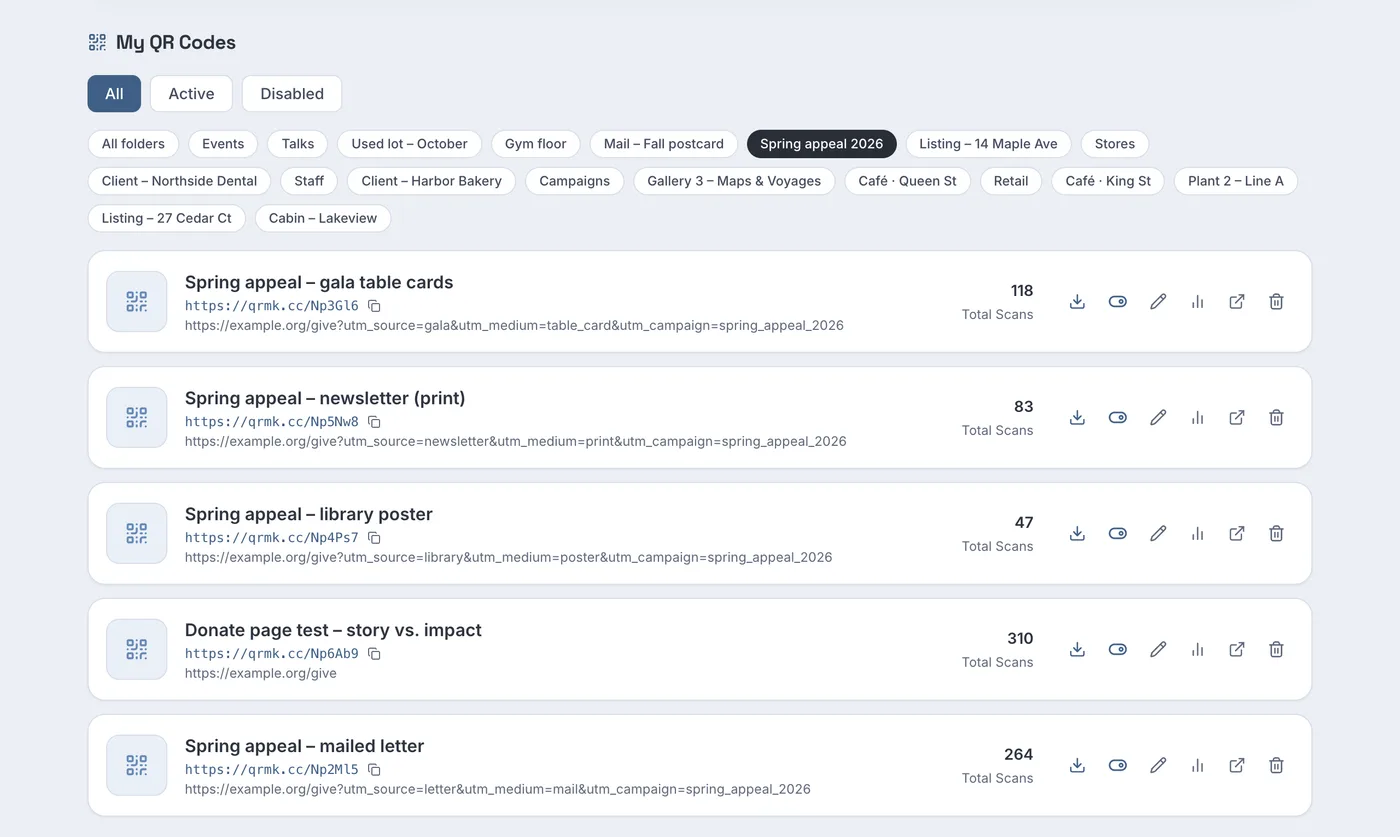
Screenshot from a demo account with sample data.
In the sample appeal, the mailed letter has 264 scans, the gala table cards 118, the newsletter 83 and the library poster 47. Open each code's daily chart before comparing them: a mailed letter's scans start when it lands and then fade, while an event's scans fall on one evening, so a fair comparison covers the whole appeal period. Scans tell you which channel brought people to the page; if your donation platform records UTM tags, it tells you which channel brought gifts.
Step 2: test two versions of the giving page
Not sure whether donors respond to a personal story or to a clear "what $50 does" page? Test both with one printed code:
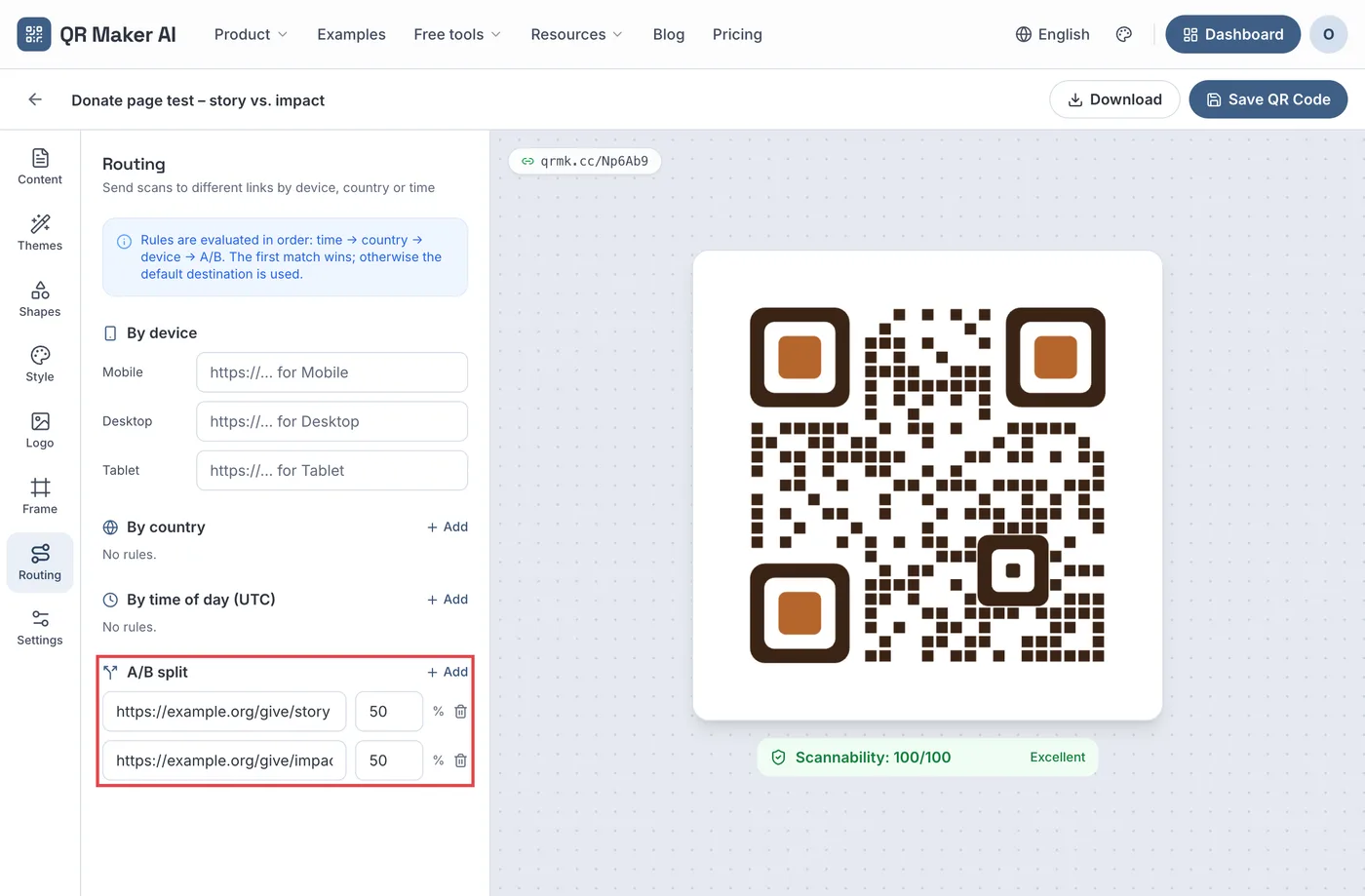
- Open the code, go to Routing and click Add next to A/B split.
- Enter the two page addresses and set both weights to 50.
- Click Save QR Code. Each scan is sent to one of the two pages at random, in proportion to the weights.
The code's analytics page then shows an A/B test results panel with each page's address, its scans and visitors, and the share you planned.

Read this carefully. With a 50/50 split the scan counts should be roughly equal, and 168 against 142 in the sample is within what a random split can produce; it does not make the story page the better one. The result that matters is how many completed gifts each page produced, which you count in your donation platform for each page address. The A/B testing guide explains how many visits you need before a difference means something.
Step 3: receipts are the giving page's job
The QR code ends where the giving page begins, and the page and its receipts carry the tax rules. In the US, the IRS says a written acknowledgment for a contribution of $250 or more must include the organization's name, the amount of a cash gift, and a statement on whether any goods or services were provided (IRS).
Event codes need a second look. If a donor pays more than $75 and receives goods or services in return, such as a gala dinner, the IRS says the charity must provide a disclosure statement, with exceptions such as goods of insubstantial value; its example is a $100 payment for a $40 concert ticket, where the deductible part is $60 (IRS). Make sure the page a gala code opens, and the receipt that follows, handles this. This is not tax advice; ask your accountant.
Step 4: report to the board without sharing a password
Board members and volunteers want numbers, not a login. On Business you can:
- invite up to 10 team members with read-only access to all codes and their analytics;
- embed one code's scan numbers on a page of your own, such as a board portal, with a key that only works on the website addresses you register;
- export each scan to CSV for your own report.
The guide to sharing analytics walks through each option.
Which plan you need
| What you want | Free | Pro | Business |
|---|---|---|---|
| One dynamic code per channel | 3 active codes, 500 tracked scans a month | Unlimited | Unlimited |
| Folders and analytics | Yes | Yes | Yes |
| A/B split between two giving pages | No | Yes | Yes |
| Read-only team access, embedded analytics, scan CSV | No | No | Yes |
| Your own short-link domain | No | No | Yes, one subdomain |
| Price as of October 2026 | $0 | $3.99 a month or $34.99 a year | $29 a month or $279 a year |
A small appeal with three channels fits the free plan. More channels and the A/B test need Pro. Business adds the board reporting and a short link on your own domain. The nonprofits use case page has more ideas, and plans are on the pricing page.
FAQ
Can a QR code accept donations directly?
No. A QR code holds a link. It opens your giving page, and your donation platform processes the payment.
How do I know which fundraising channel worked?
Give each channel its own dynamic code and UTM tags. Compare scans per code, then completed gifts per UTM source in your donation platform, if it records UTM tags.
How can donors tell a donation QR code is genuine?
Print your organization's name and web address next to the code and send it to a page on your own domain. Check public posters for stickers placed over your code.
Does the QR code need to show tax information?
No, but the receipt may need to, and for payments that include goods or services the disclosure can go with the appeal or the receipt. US rules cover acknowledgments for gifts of $250 or more and disclosures for payments over $75 that include goods or services.
Sources
- Federal Trade Commission — Before Giving to a Charity. Consumer Advice, September 2025. Accessed 25 October 2026.
- Federal Trade Commission — When donating, support those in need, not a scammer. Consumer Alert, 27 August 2026. Accessed 25 October 2026.
- Google — URL builders: Collect campaign data with custom URLs. Analytics Help, undated. Accessed 25 October 2026.
- Internal Revenue Service — Charitable contributions: Written acknowledgments. Last reviewed or updated 28 June 2026. Accessed 25 October 2026.
- Internal Revenue Service — Charitable contributions: Quid pro quo contributions. Last reviewed or updated 28 June 2026. Accessed 25 October 2026.