The short answer
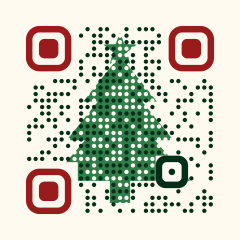
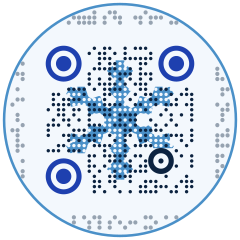
Choose the Christmas tree, Snowflake or Gift box theme in the editor’s Style tab. The code is redrawn with the motif showing between its dots, switched to error-correction level H, and stays a standard QR code that ordinary camera apps read. Print it at least 2.5 cm (1 in) wide on cards and gift tags, and make it dynamic so the code on shop windows and menus can point to your January page instead of an expired offer.
Pick a theme


How to make a Christmas QR code
Choose the destination
A holiday menu, a gift guide, a last-order-date page, a video greeting or a donation page. For cards sent to many people, a greeting page or a short video works well.
Create a dynamic code
Save a dynamic URL code and name it after the printed item, such as “Window decal – December”. You will repoint it after the holiday.
Apply a Christmas theme
In Style, open Holiday & art themes and pick Christmas tree, Snowflake (round, inside a circle) or Gift box. The snowflake’s circle shape suits round stickers and ornaments.
Keep the light background
Each theme comes with a light background behind the dots. On red or green cards, place the code on that panel rather than knocking it out onto the colored stock.
Proof under the real light
Shop windows reflect at night and glitter card scatters light. Print one sample, put it where it will hang, and scan it in the evening as well as during the day.
Size, distance and placement
- Code type
- Dynamic URL code with a Christmas theme; standard QR with level H error correction
- Greeting card or gift tag
- Minimum 2.5 cm (1 in) on a flat, matte area
- Round sticker or ornament
- Snowflake theme in its circle shape, at least 4 cm (1.6 in) across
- Shop window decal
- Read from 1–2 m: 10–20 cm (4–8 in), inside the glass with a white backing
- Restaurant table card
- Read at 30–50 cm: 3–4 cm (1.2–1.6 in)
- Finishes
- Glitter, foil and metallic ink around the code, not over it
- After 25 December
- Repoint the code to a January sale, returns information or next year’s sign-up
Why a dynamic code for the holiday season
Christmas print has a hard end date. Cards stay on mantelpieces into January, window decals stay up until someone peels them off, and gift tags travel with the presents. A static code keeps sending every scan to the December offer. A dynamic code lets you switch the destination on 26 December to returns information, a January sale or a thank-you page, and scan counts show whether the window or the cards brought more visits. Themes are free; blending your own photo into the code needs Pro, and so does setting an expiry date.
Common mistakes
Tip: give each channel its own code: one for cards, one for the window, one for receipts. In January the scan counts tell you which one to repeat next year.
Frequently asked questions
Can I make a Christmas tree QR code that still scans?
Yes. Choose the Christmas tree theme: the editor draws each module as a dot, lets the tree show between the dots and keeps the corner markers solid. It is a standard QR code with error correction set to H.
How small can a QR code on a Christmas card be?
About 2.5 cm (1 in) wide is the practical minimum for art themes. A plain black-and-white code can go down to 2 cm.
Are the Christmas themes free?
Yes, every holiday theme is free, and so is PNG export. SVG and PDF export for professional print, expiry dates and blending your own photo into a code are Pro features.
Can the same code point somewhere else after Christmas?
Yes, if you save it as a dynamic code. Edit the destination at any time and every printed card, tag and decal follows.